




Asynchronous Needs Map for B2B Platform Implementation
A free spreadsheet that helps you gather needs from different areas of your company and give your team a shared starting point for defining a B2B platform's scope.
FREE GOOGLE SPREADSHEET
Google Sheets will open so you can make a copy of the spreadsheet.
Create your own copyBack to free tools and materialsOne company, many perspectives
Sales, e-commerce, logistics, finance and IT each see a B2B platform from a different angle. To define its scope well, first understand what people in each area need.
The Asynchronous Needs Map is a spreadsheet that helps you gather those answers. Each person fills in the sheet for their area when it suits them. You do not need to know about e-commerce or technology — just describe your team’s needs and how it works.
Google Sheets will ask you to make a copy. You can share your own spreadsheet with your team and fill it in using your team’s examples.
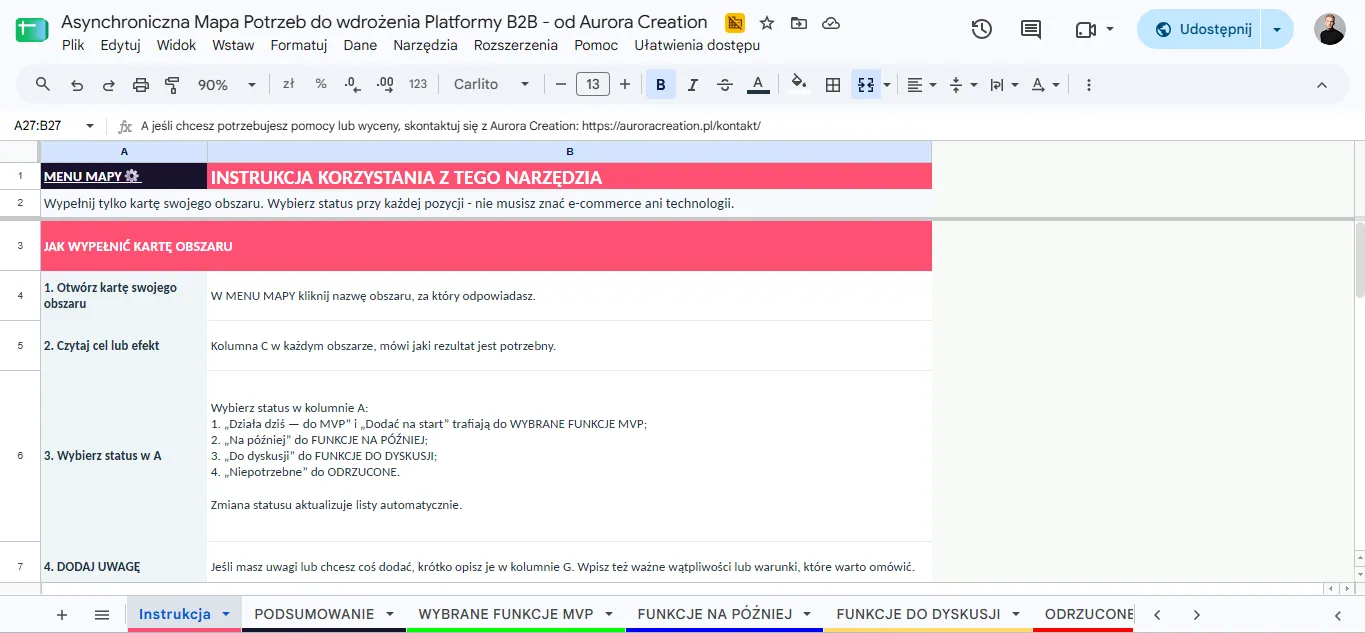
Screenshot preview — click or tap to enlarge it.
In your copy, open the Instructions tab and follow the steps there. Completing one area’s sheet takes about 15 minutes.
What is the tool for?
The map helps you gather expectations from different teams in one place and turn broad ideas into specific needs. It makes it easier to agree on:
- what the platform should provide on launch day;
- which current functions matter and should not disappear;
- what can wait until a later stage;
- which questions need a discussion because a need or way of working is still unclear.
The spreadsheet organises answers and updates its summaries automatically. It does not replace a conversation about processes or a decision about project scope — it gives that conversation a shared starting point.
How does the map work?
Choose your area’s sheet and assess the needs listed there. Column C describes the result you need. For each item, choose a status in column A and, if useful, add context in column G.
Your choices immediately update the lists and summary. The MVP FEATURES SELECTED tab shows the features that should work from launch — both those already in use and those to add. SUMMARY shows the number of responses and completion progress. Separate tabs gather items for discussion, later and not needed. Nothing has to be moved by hand.
How do I fill in my area’s sheet?
- Open the MAP MENU tab and choose your area.
- Read the outcome in column C. If you need more detail, read the feature description too.
- In column A, choose one status for each item you can assess.
- If your answer depends on a particular process, customer or condition, explain it in column G. This field is optional.
- Return to SUMMARY or the result tabs to see how the answers fit together.
Fill in only your area’s sheet. You do not have to assess every item — if you do not know whether a feature is needed or how it should work, choose “For discussion” and note your question or uncertainty in column G.
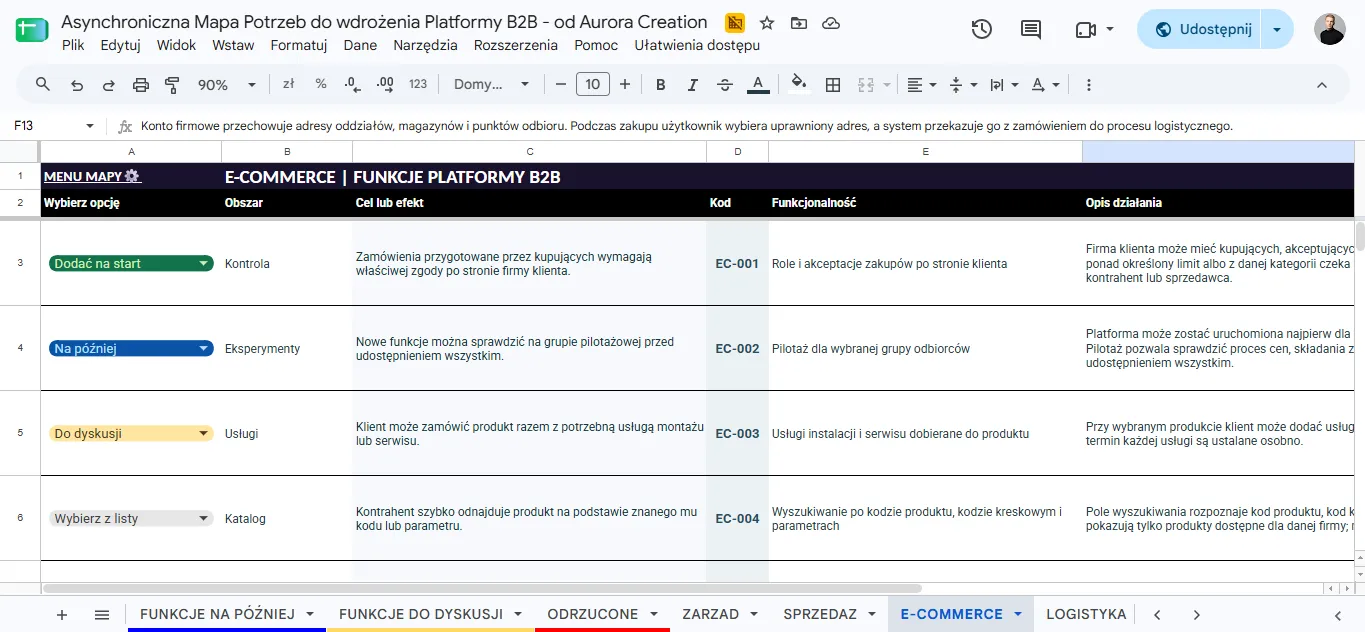
The screenshot shows example statuses. In your own copy, choose a status for each need from your area’s perspective. Add context in column G if it helps.
What do the statuses mean?
- Works today — for MVP — this need is already covered and should remain available in the new platform. It counts towards the MVP.
- Add at launch — we need this feature when the new platform launches. It counts towards the MVP.
- Later — we need this, but it can wait until a later stage.
- For discussion — it is not yet clear whether the feature is needed or how it should work. Add a question or uncertainty in column G.
- Not needed — your area does not need this feature.
Answer based on how your area works. You do not need to assess the technical solution or decide how the platform should deliver it.
How do I introduce the map to my team?
You could start with a short explanation:
We are gathering needs for our B2B platform so we can see what matters to our area. Please fill in only our sheet. For each item, choose a status in column A. If your answer depends on a particular case or process, add context in column G. You do not need to know about e-commerce or technology. If you are not sure whether a feature is needed or how it should work, choose “For discussion” and write down your question.
Before you begin, agree on who will fill in the sheet, when to collect the answers and who should receive questions. Once the sheet is complete, review the “For discussion” items together and decide whether they are needed and how they should work. Leave the other areas’ answers to their teams.
How do I make my own copy of the spreadsheet?
- Click “Create your own copy” on this page.
- Sign in to your Google account if asked.
- In Google Sheets, choose “Make a copy.” You can name the file and choose a folder in Drive.
- In your copy, click “Share” and add the people who will fill in the spreadsheet.
- Send them a link to your copy and a deadline for completing their sheet.
Your team’s answers will be saved in the copy you created.
How do I share the copy with my team?
- Open your copy of the spreadsheet and click “Share.”
- Enter the work email addresses of the people who will fill it in. You can also add a Google Group used by your company.
- Choose “Editor” so your team can enter answers. Choose “Viewer” for people who only need to read the spreadsheet.
- Click “Send.” Google Sheets will email invitations to those addresses. You can return to “Share” later to add people or change their access.
Inviting specific people by email is the simplest option. If you prefer to share a link, check the “General access” setting and your company’s sharing policy. Share the link to your copy, not the source spreadsheet.
What should we do after collecting the answers?
Check the progress and summary, then discuss the items in FEATURES FOR DISCUSSION together. Agree whether each need belongs in the MVP, should wait until later or should be rejected. The MVP list will then show what should work from launch — including what is already an important part of your team’s work today.
The map helps start a conversation and organise its outcome. Your team’s answers are a basis for further planning of the B2B platform’s scope.
Asynchronous Needs Map for B2B Platform Implementation — by Aurora Creation
Material for participants of the talk “One company, radically different team needs… How do you reconcile them and deliver a B2B platform?” at the E-commerce B2B event.
Gather your team's needs in one place
Make your own copy of the map, share it with your team and start organising the needs for your B2B platform.